

Behind every visible deliverable are people, decisions, tools and processes.
A published video may involve strategy, scripting, production, editing and approval. A website release may involve requirements, design, engineering, testing and monitoring. A customer enquiry may move through several teams before it is resolved.
Explore how the work connects.
Explore functions and workflows
Explore our functional operating model. Roles and tools below illustrate how an engagement can work; they are not a formal organization chart or live company activity.
Strategy & Business Consulting
Turn business context into a useful positioning and execution plan.
Marketing & Growth
Connect audience, offer, channels and measurement around the customer journey.
Connected functionCreative & Content Production
Turn clear briefs into coherent creative assets and a repeatable production rhythm.
Connected functionSoftware Development
Implement usable digital tools and integrations for a defined business requirement.
Connected functionIT & Infrastructure
Support access, environments and operational ownership around the technology.
Business Operations & Project Management
Keep objectives, workstreams, owners and improvement connected.
Connected functionCustomer Support & Community
Keep customer conversations, knowledge and escalation accountable.
Connected functionQuality Assurance & Analytics
Check work against the brief and use real observations to guide decisions.
Quality Assurance & Analytics
Delivering a task is not the same as confirming that it works.
Quality assurance compares the output with its requirements. Analytics and operational reporting help teams understand what happened after delivery.
Why this work exists
Check work against the brief and use real observations to guide decisions.
Relevant inputs
- Agreed requirement
- Reviewable output
- Baseline and measurement definition
Business problems
- Unclear quality standards
- Unreliable reporting
- Decisions without a baseline
Responsibilities
- Acceptance and quality checks
- Measurement definitions
- Feedback and improvement review
Typical deliverables
- QA findings
- Reporting definitions
- Review and experiment notes
Quality check
Compare output with requirements, record defects and verify corrections.
Business contribution
Summary:
Illustrative WorkflowThis is the function and process an engagement can require. Linked public products show the operating context; they do not verify an internal organization chart, a private system or a specific client deliverable.
Tool options
- QA checklists
- Native analytics
- Agreed reporting tools
Contributing roles
Quality reviewer · Analyst · Business owner
The function workflow
- 01Requirements
- 02Checks
- 03Defect Review
- 04Correction
- 05Verification
- 06Reporting
Connects with
Explore the execution flow
Related services
Related work and operating context
Public product evidence and historical records are distinguished within each case.
Business Optimization
Observe the real process, implement a useful change and measure it without assuming the outcome.
Illustrative execution flow. Select a step to see its owner, work, tools, output and quality check.
- 01Operational Audit
- 02Bottleneck Identification
- 03Process Redesign
- 04Automation
- 05Implementation
- 06Measurement
- 07Optimization
Implementation
- Why this step exists
- Makes the agreed process usable through tools, instructions and handover.
- Relevant input
- Bounded automation plan
- Responsible role
- Project Coordination & Owners
- What happens
- Introduce the agreed process and prepare relevant people.
- Tools and methods
- Project system, training materials
- What is produced
- Working process and trained owners
- Quality check
- Test handoffs and provide a fallback.
- Business contribution
- Makes the agreed process usable through tools, instructions and handover.
Working process and trained owners
A sanitized example of the information this step should make visible. This is a workflow demonstration, not a client screenshot or measured result.
Owner: Project Coordination & Owners
Work: Introduce the agreed process and prepare relevant people.
Ready for handoff when: Test handoffs and provide a fallback.
Next: Measurement
Related work and evidence
These cases identify the product context, recorded scope and evidence limits; they do not certify the illustrative workflow as a deployed client process.
Public evidence for the operating context
The public view below demonstrates the business context. The step-by-step model above remains illustrative; private implementation and operational results are not established by the screenshot.
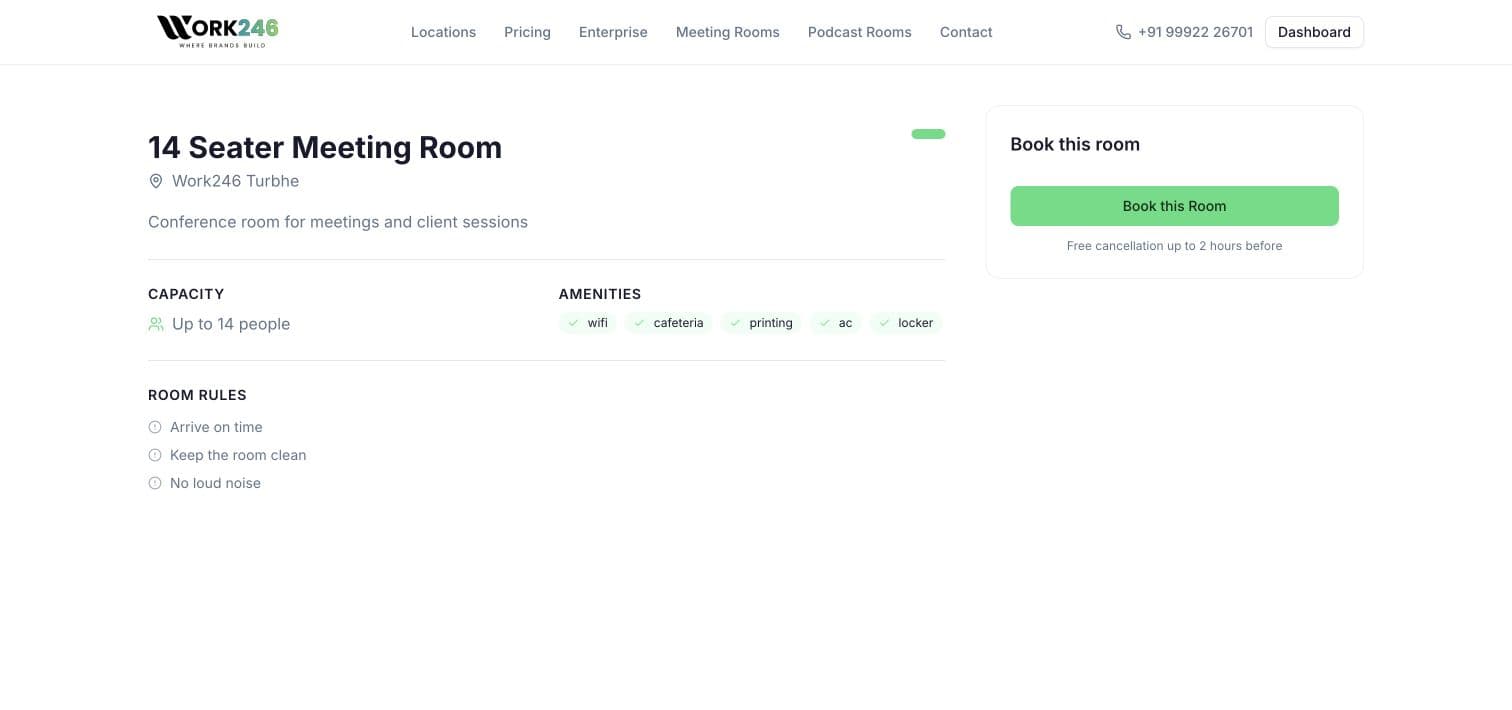
A real shared-facility listing
Public Turbhe room listing captured on 11 October 2026. The listing and booking entry point are observable; occupancy, member records, billing, attendance and integrations were not internally verified.
View the public sourceSee How Work Moves.
Follow the connections from the original requirement through specialized work, quality checks and improvement.
The Systems Behind the Business
Explore where technology and shared information connect functions. These examples describe system roles, with the actual stack chosen for the engagement.
CRM systems
Keep enquiries, owners, stages and follow-ups connected.
Connects
Project management
Sequence work, dependencies, deadlines and responsible owners.
Connects
Marketing dashboards
Connect channel findings to agreed business indicators.
Connects
IT management
Keep access, environments and technical ownership visible.
Connects
AI-assisted workflows
Support bounded tasks with review and explicit data boundaries.
Connects
Automation
Connect repetitive steps while preserving exception handling.
Connects
Customer support systems
Maintain conversation context, routing and resolution records.
Connects
Knowledge bases
Turn repeated questions into shared, reviewable answers.
Connects
Internal reporting
Make delivery status and operational findings understandable.
Connects
Standard operating procedures
Document actions, owners, handoffs and escalation.
Connects
Digital asset management
Organize approved versions, rights and handover packages.
Connects
Quality assurance
Review outputs against the brief and acceptance conditions.
Connects
Performance monitoring
Review agreed measures, exceptions and customer feedback.
Connects
A Coordinated Operating Model
- Client Requirement
- Discovery
- Strategy
- Project Management
- Specialized Teams
- Quality Assurance
- Deployment
- Reporting
- Optimization
Strategy sets the objective; project coordination connects delivery; specialists produce the work; quality assurance checks the output; reporting guides the next improvement. Responsibilities are agreed for each engagement.
See How We Improve Businesses
Explore practical process changes. These scenarios are illustrative, with no measured client results implied.
Lead Management

Before
Enquiries spread across email, WhatsApp and social platforms, without clear ownership or follow-up visibility.

Improvement
A centralized CRM, lead assignment rules, defined follow-up workflows and reporting.

Business Value
Better response coordination, clearer accountability and a more measurable sales process.
- Enquiry
- CRM record
- Owner assigned
- Follow-up
- Reporting
Let's Build Something That Works Better.
Tell us what you're building, what isn't working or what needs to grow. We'll start with the business problem and explore the right combination of capabilities.
D-0011, Akshar Business Park, Sector 25, Vashi, Navi Mumbai, Maharashtra, India